Words with EZ Cheats
Games ExtrasWord
3.849.00 Reviews
- Version
- 7.5.0
- Installs
- 10.00K
- Age Rating
- Everyone
Screenshots
Our Review of Words with EZ Cheats
 Analysis by Appyee
Words with EZ Cheats is a small word-game companion from Games Extras, built around one very specific purpose: helping players find possible answers while playing WWF. I approached it less like a traditional game and more like a practical utility for a word board game. That distinction matters, because the right question is not whether it offers a rich standalone experience. The better question is whether you want assistance when a board leaves you staring at an awkward rack of letters.
In my experience, the appeal is immediate. You enter the letters you have, use the tool to narrow the possibilities, and return to the match with a clearer idea of what can be played. It is free, rated for Everyone, and available for Android devices running at least version 8.0. The app has passed the early novelty stage as well: it was released on January 11, 2023, and its current version is 7.5.0.
That focused design is both its main strength and its main limitation. If you want vocabulary practice, a friendly solo mode, or a complete replacement for a word board game, this is not the right kind of download. If you want a quick helper for difficult turns, however, it can be useful. My recommendation depends heavily on how you personally define fair play and what you expect from an assistant rather than from a game.
What I would check before choosing it
Before choosing it, I’d decide what you want to preserve about your word-game routine: convenience, independent recall, or a bit of both. I’d also think about whether checking suggestions after a match would suit you better than consulting them mid-turn, since that choice can make a helper feel like a study aid rather than a shortcut. That personal fit is what I’d weigh before looking at its longer-term value.
Decide whether you need a helper or another word game
The first decision is about the role you want the app to play. Words with EZ Cheats is listed as a word game, but I would treat it as a companion tool for WWF rather than as a full word-game destination. Its store summary identifies it as an OCR cheat for WWF, while the short description presents it as a way to get word help. In practical terms, that points toward solving a particular board situation instead of starting a separate match inside the app.
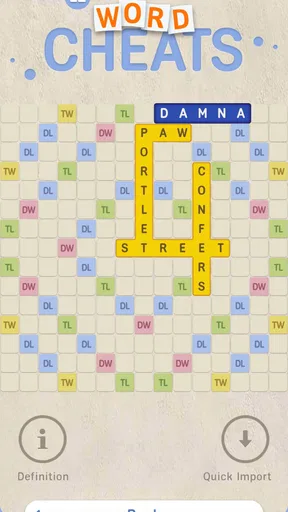
This makes it appealing when the problem is narrow. Maybe you have a rack containing several consonants, a board full of premium squares, and no obvious move. Maybe you recognize a word but are unsure whether your letters can produce a better scoring option. A helper can reduce that moment of uncertainty. It is less appealing if your goal is to become better at spotting patterns without assistance, because looking up an answer can remove the useful struggle that builds your own skill.
I would also decide how you plan to use it before installing. In a casual match against a friend, using outside help may change the spirit of the game. In a solo practice session, it can be a learning aid. In a competitive match, the question is not technical but personal: does the other player know and accept that you are using assistance? The app cannot make that decision for you.
Think about the kind of input that suits your routine
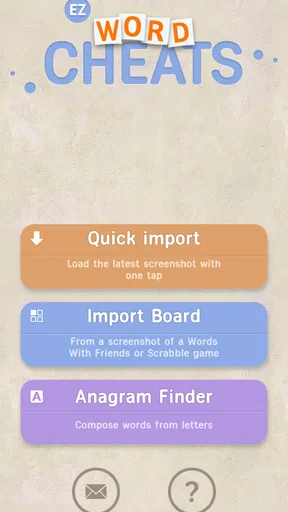
The OCR reference is important because it suggests a workflow based on reading letters from the game rather than relying only on manual typing. That can be convenient when a board is already visible on your phone. Instead of copying every letter by hand, you may be able to use the recognition-oriented approach and move more quickly from the match to possible answers.
At the same time, OCR is not something I would treat as magic. A screenshot can contain small letters, unusual contrast, overlapping elements, or a board layout that makes recognition harder. When the result looks suspicious, I would verify the letters manually before trusting the suggestions. A single misread tile can send the entire search in the wrong direction, especially when a blank tile or a rare letter is involved.
That gives the app a useful two-stage workflow. First, let the tool save time by interpreting what is on screen. Second, inspect the input before acting on the output. The second step is easy to skip when you are in a hurry, but it is the difference between a helpful shortcut and a confusing list of irrelevant words.
Use the rating as a signal, not as a verdict
The app holds an average rating of 3.8 from over two hundred ratings, with dozens of written reviews. I read that as a mixed but meaningful signal. There is enough response to show that people are using it for a real purpose, yet the score is not so high that I would assume every device, board image, or playing style will produce the same experience.
For a narrow utility, ratings can also reflect expectations rather than only reliability. Someone looking for a complete word-game experience may judge it harshly because it does not offer that kind of content. Someone who only needs occasional help may be satisfied with a simpler interface. I would therefore compare the rating with your own needs instead of treating it as a universal quality score.
Keep the device requirement in mind
Words with EZ Cheats supports Android 8.0 and later. That covers many still-used phones, but it is worth checking the operating system before planning to use it on an older spare device. Since the tool is most useful beside another game, a practical setup is to keep the match open on one device and use the helper on another when possible. That avoids repeatedly switching screens and makes it easier to compare the recognized letters with the original board.
If you only have one phone, the experience may still be workable, but the convenience depends on how easily you can move between the game and the assistant. This is one of those apps where the surrounding workflow matters almost as much as the core idea. A fast helper becomes less helpful if every turn requires awkward navigation, repeated screenshots, or careful re-entry.
Where the focused design helps
The strongest advantage is concentration. Words with EZ Cheats does not try to be a dictionary, a social network, a vocabulary course, and a board game at the same time. Its identity is tied to finding words for WWF, so I can understand why a player would keep it available for difficult turns rather than search through a general web tool.
That focus also reduces the mental work involved in choosing an alternative. A general search engine can return definitions, anagram pages, unrelated word lists, and advertisements before you reach something useful. A dedicated helper is more direct when your question is simply, “What can I make from these letters?” The value is not necessarily in discovering a new type of word puzzle; it is in shortening the path from a stuck position to a possible move.
Another advantage is that the app is free. That makes experimentation easy, especially for a player who only needs help now and then. You do not have to commit money just to find out whether an OCR-based helper fits your routine. The Everyone content rating also makes it suitable for a broad audience from an age-classification perspective, although individual families may still want to set their own rules about using cheats in games.
I also like the possibility of using it as a teaching tool rather than an automatic answer machine. After a turn, you can review the words you overlooked and notice recurring patterns: short hooks, common endings, or ways a difficult letter can be placed beside an existing tile. That approach preserves some learning value. The app becomes a prompt for reflection instead of a button that removes all decision-making.
Three practical habits that make it more useful
My first tip is to separate recognition from judgment. If the app reads the board or letters for you, compare its interpretation against the actual game before selecting a word. This is particularly important when the board includes blank tiles or when a screenshot does not clearly distinguish a letter from nearby interface elements. Treat the captured input as a draft, not as proof.
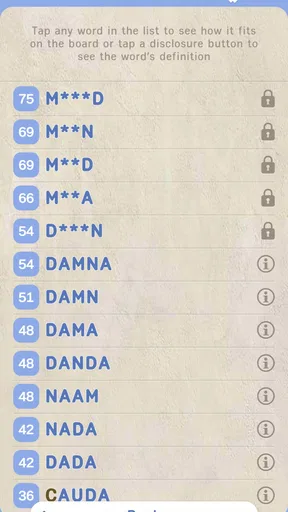
My second tip is to use the output to compare choices, not merely to grab the longest-looking word. A longer word is not automatically the best move. In a board game, placement, existing letters, and access to valuable squares can matter more than length. I would use the suggestions as a menu, then return to the board and ask which legal placement improves the position rather than which answer looks most impressive in isolation.
My third tip is to keep a small mental note of repeated discoveries. If the tool repeatedly shows useful two-letter combinations or familiar word endings, remember them for the next match. This turns a potentially passive cheat into a personal study loop. Over time, you may find that you need the helper less often because the patterns have become familiar.
A fourth habit is to use it selectively. If you consult it on every turn, you may finish matches with more answers but less confidence in your own vocabulary. If you reserve it for genuinely difficult racks, disputed-looking combinations, or practice after a match, it can support improvement without taking over the whole experience. That balance is where I see the most value.
Where a different category may fit better
The usual alternative is a general anagram solver. That kind of tool may be better when you want to enter letters manually, experiment with word lengths, or use the same search process across several word games. A dedicated solver can also suit players who do not want an OCR workflow at all. If your routine changes from one board game to another, a broader tool may be more flexible than something built around WWF.
A dictionary app is a better choice when your main goal is checking meaning, spelling, pronunciation, or usage. Words with EZ Cheats may help surface a possible answer, but finding a word and understanding a word are different tasks. For students, writers, or language learners, a dictionary offers more lasting value because it explains the result instead of only helping with the move.
A vocabulary trainer may be preferable if you want to improve without outside assistance. Flashcards, timed challenges, and word exercises can build recall in a way that a cheat-oriented utility cannot. I would choose that category for someone who enjoys the challenge of learning new words and wants progress to come from practice rather than from solving one board at a time.
Finally, the official game itself remains the better option for anyone seeking the complete playing experience: opponents, turns, board decisions, and the satisfaction of winning through your own choices. This helper is not a substitute for that experience. It sits beside it, and whether that is positive or negative depends on your rules for play.
The real trade-off: speed versus ownership
The central trade-off is simple. The app can make a stuck turn faster, but it can also make the answer feel less like yours. That is not a flaw in the software so much as a consequence of its purpose. I would be comfortable using it after a match to understand what I missed, or during a relaxed solo session where experimentation is the point. I would be more cautious in a friendly match unless everyone agreed to the same approach.
There is also a trade-off between convenience and verification. OCR can reduce typing, but recognition errors create a new task: checking that the letters were captured correctly. Manual entry takes longer but gives you direct control over the input. If you are playing on a small screen or moving quickly, the app may save time; if the board is visually complicated, manual confirmation becomes essential.
Switching from another helper should not be difficult when your needs are limited to WWF assistance, but the change may feel less worthwhile if you already use a reliable general solver. The reason to choose this app is its focused workflow, not the expectation that it will replace every word-related tool on your phone. I would install it when the WWF-specific angle matches my routine, then keep a dictionary or broader solver for tasks outside the match.
Who should use it, and who should skip it
I would recommend Words with EZ Cheats to a casual WWF player who occasionally gets stuck and wants a quick way to explore possible words. It also makes sense for someone practicing board strategy, provided the suggestions are treated as examples to study rather than automatic moves. Its free price lowers the barrier to trying that workflow, and its focused purpose is easy to understand.
I would be less likely to recommend it to a player who values completely unaided competition. If the challenge is specifically about recalling words under pressure, a cheat helper works against that goal. I would also point language learners toward a dictionary or vocabulary app when explanations and structured practice matter more than finding a playable combination.
People who play several different word games should think carefully before choosing a WWF-focused assistant. A general anagram tool may offer a more consistent routine across titles. Likewise, anyone expecting a polished standalone game with levels, progression, or social features should look elsewhere rather than judging this utility for not being something it was not designed to be.
My final recommendation
After considering the app as a decision rather than simply a download, I see a clear place for it. Words with EZ Cheats is most useful when you want targeted help beside a WWF match, not when you want another complete game. Its OCR-oriented concept can make letter entry more convenient, its free availability makes testing straightforward, and the current version shows that the project is still being maintained as a usable Android option.
I would install it for occasional assistance, post-match learning, and relaxed play. I would verify every captured rack, compare suggested words with the actual board, and avoid treating the first result as automatically optimal. Those small habits address the main friction points and preserve some of the thinking that makes word games enjoyable.
My final verdict is therefore positive but conditional. Choose it if the WWF connection and quick word-help workflow are exactly what you need. Choose a dictionary, vocabulary trainer, or general solver if your goal is broader language learning, cross-game flexibility, or unaided improvement. For the right player, this compact tool can remove a frustrating dead end without demanding much commitment; for the wrong player, it may simply remove the challenge they downloaded the game to enjoy.
Verdict
Strengths of Words with EZ Cheats
- Simple interface makes it easy to start a new word puzzle quickly.
- Helpful cheat tools can assist when you are stuck on difficult words.
- Useful for expanding vocabulary through repeated word discovery.
- Lightweight gameplay works well for short sessions on mobile devices.
- Suitable for casual players who prefer relaxed, non-timed challenges.
Limitations of Words with EZ Cheats
- Some solutions may feel too obscure for players with limited vocabulary.
- Cheat features can reduce the satisfaction of solving puzzles independently.
- Puzzle variety may become repetitive after extended play sessions.
- Advertising may interrupt gameplay or clutter parts of the interface.
- The app may offer limited depth for users seeking competitive word modes.
Similar Picks in This Category
View All
Word Search - Word Puzzle Game
Bluetile4.8

Word Search Quest - Puzzles
Blackout Lab4.8

CodyCross: Crossword Puzzles
Fanatee, Inc.4.7

Words of Wonders: Crossword
Fugo Games4.9

Wordscapes: Word puzzle game
PeopleFun4.7

Word Search Explorer
PlaySimple Games4.9
Frequently Asked Questions
What is Words with EZ Cheats?
Words with EZ Cheats is a word-game companion designed to help players find possible answers, check word validity, and improve their performance in popular word puzzles. It can be useful when you are stuck, learning new vocabulary, or trying to understand scoring possibilities. Before downloading, remember that its exact features may vary by version and device, so review the app description and permissions carefully.
How does Words with EZ Cheats help solve word games?
The app generally works by allowing you to enter available letters, tiles, or game information and then displaying matching words or suggestions. Depending on the puzzle, you may be able to apply filters such as word length, starting letters, or ending letters. Results should be treated as hints rather than guaranteed solutions, since different games may use different dictionaries, rules, and accepted word lists.
Is Words with EZ Cheats suitable for beginners?
Yes, the app can be helpful for beginners who are still learning spelling patterns, unusual words, and basic word-game strategies. Using it occasionally may help you understand why certain combinations score well or which words are valid. However, relying on every suggested answer can reduce the learning experience, so it is better used as a study aid or occasional hint instead of a replacement for independent play.
Is Words with EZ Cheats free to download and use?
Availability, pricing, advertisements, and premium features can depend on the platform and the current version of Words with EZ Cheats. Some functions may be accessible without payment, while additional tools could require in-app purchases or a subscription. Check the official Google Play or App Store listing before installing, paying particular attention to the pricing section, trial terms, and whether recurring billing is mentioned.
Is it safe and fair to use Words with EZ Cheats?
The app may be safe when downloaded from an official store and kept updated, but you should still check its developer information, ratings, privacy policy, and requested permissions before installation. Fairness depends on how you use it: hints can support learning or casual play, while using answers during competitive games may violate the rules or spirit of the service. Avoid sharing private account details with any third-party tool.
Play our best games!


